@JsonIgnore
发表于|更新于
|浏览量:
沙漠之所以美丽,是因为在某个不知道的地方藏有一口井。——《小王子》
在项目开发中,有时会遇到一些字段并不需要或者不能返回给前端的时候(例如密码等)
则可以在对应的属性上加com.fasterxml.jackson.annotation.JsonIgnore注解
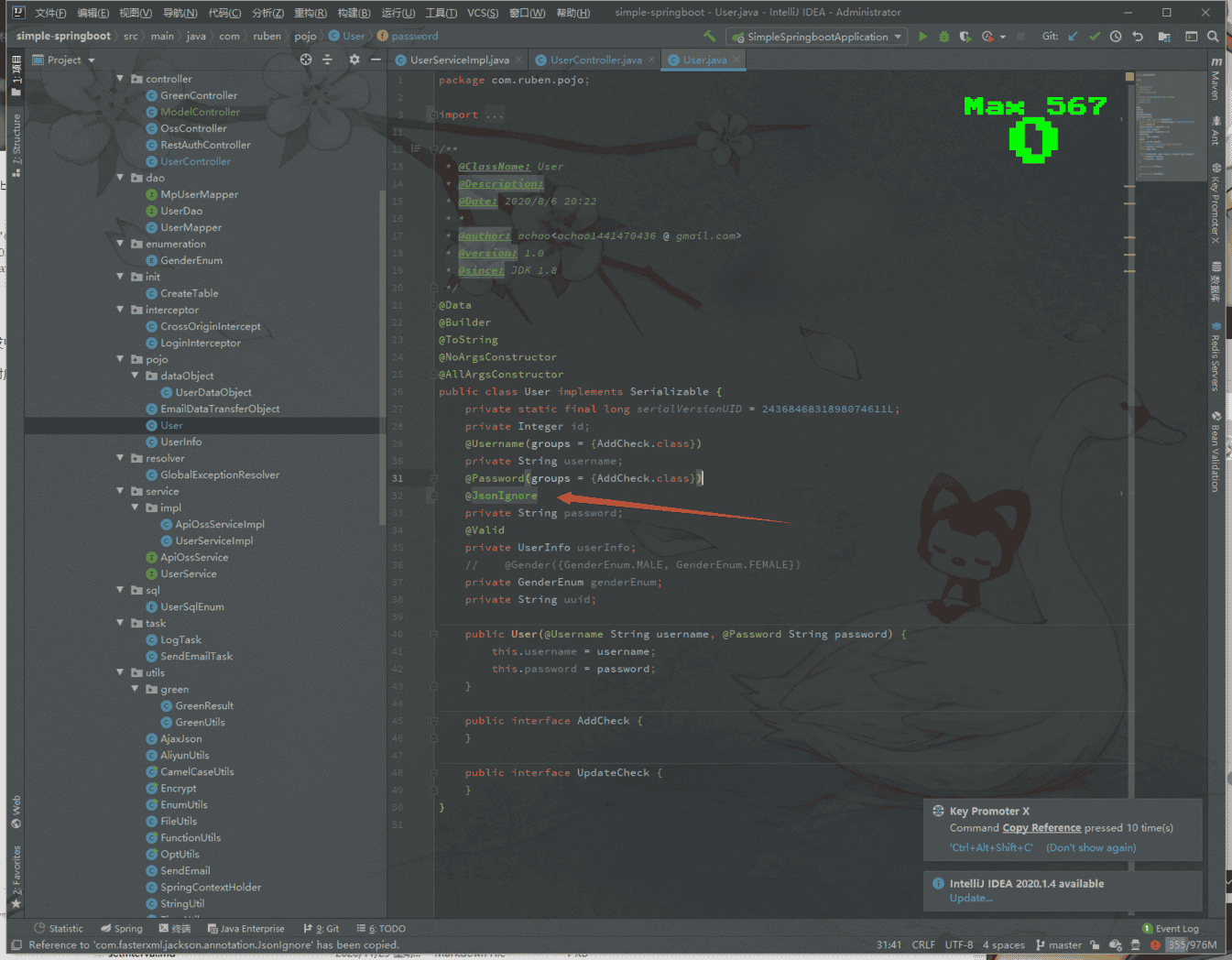
这样的话,在返回的时候就不会被序列化了
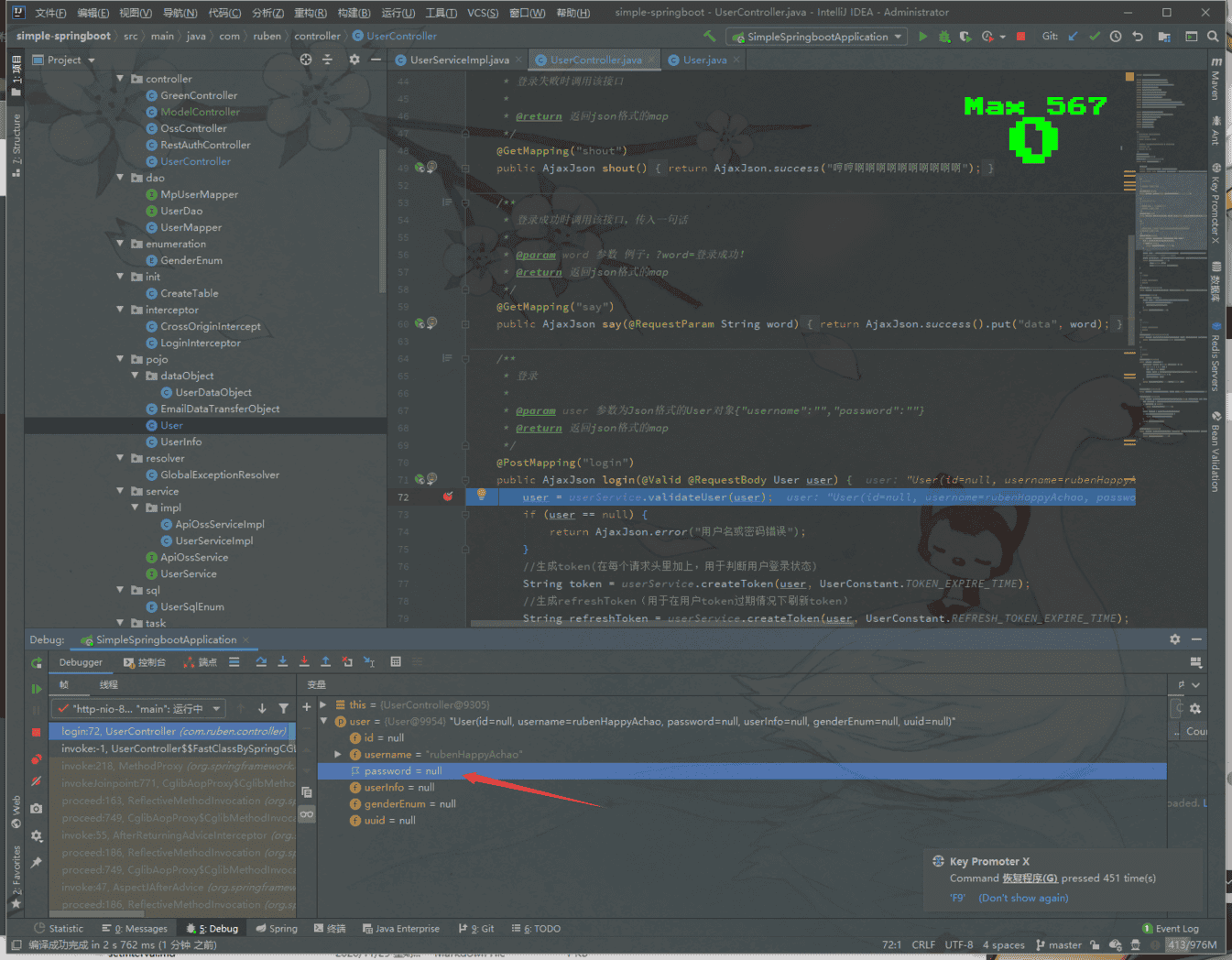
不过注意,如果加了@JsonIgnore注解,在接收参数时同样不会被序列化
相关推荐
2023-06-03
java图片切片
女人绝不会被奉承解除武装,而男人大都会陷落。——王尔德 可以使用hutool的ImgUtil.slice 1ImgUtil.slice(FileUtil.file("d:/test/logo.jpg"), FileUtil.file("d:/test/dest"), 200, 150); 123456789 /** * 图像切片(指定切片的宽度和高度) * * @param srcImageFile 源图像 * @param descDir 切片目标文件夹 * @param destWidth 目标切片宽度。默认200 * @param destHeight 目标切片高度。默认150 */public static void slice(final File srcImageFile, final File descDir, final int destWidth, final int destHeight) 而且除了指定宽度和高度的,还可以使用: 12345678910/** * 图像切割(指定切片的行数和列数...
2025-04-12
MinecraftForge
毋为已消逝之年华叹息,须正视匆匆溜走的时光。 ——欧洲谚语 什么是 MinecraftForge?MinecraftForge 是一个为 Minecraft 提供的开源模组开发框架,它是 Minecraft 社区中最受欢迎的模组开发工具之一。通过 Forge,开发者可以轻松创建和加载模组(Mods),并扩展 Minecraft 的功能。Forge 的生态系统支持数千个模组,是 Minecraft 游戏创新的核心平台。 核心特点 模组兼容性: Forge 提供了一个标准化的接口,让不同的模组可以无缝工作,减少冲突。 支持多个模组同时运行,方便玩家自由搭配。 开发工具: 提供全面的 API,方便开发者调用 Minecraft 的核心功能。 ForgeGradle:一个集成了 MinecraftForge 项目的 Gradle 插件,用于简化模组开发构建流程。 跨版本支持: Forge 会随着 Minecraft 的更新而更新,支持多个 Minecraft 版本(如 1.12、1.16、1.18 等)。 强大的社区: Forge 拥有一个庞大的开发者和玩家社区...
2022-01-19
hutool-bom
一个能思想的人,才真是一个力量无边的人。——巴尔扎克 官方文档 我们在使用hutool时可以像如下方式引入单独引入所需模块: 123456789101112131415161718192021222324252627282930313233343536373839<?xml version="1.0" encoding="UTF-8"?><project xmlns:xsi="http://www.w3.org/2001/XMLSchema-instance" xmlns="http://maven.apache.org/POM/4.0.0" xsi:schemaLocation="http://maven.apache.org/POM/4.0.0 https://maven.apache.org/xsd/maven-4.0.0.xsd"> <properties> <hutool.versi...
2023-08-05
spring-statemachine
绝不能怜悯不该怜悯的家伙——达·芬奇 https://spring.io/projects/spring-statemachine Spring 状态机是应用程序开发人员将状态机概念与 Spring 应用程序一起使用的框架。 文档: Spring Statemachine - Reference Documentation 运行一个demo: 123456789101112131415161718192021222324252627282930313233343536373839404142434445464748495051525354555657585960616263646566676869707172737475767778798081828384858687888990919293949596979899100101102<?xml version="1.0" encoding="UTF-8"?><project xmlns="http://maven.apache.org/POM/4.0.0&qu...
2023-10-14
srs的http api鉴权
怒后不可便食,食后不可发怒。——梁章钜 文档 https://ossrs.net/lts/zh-cn/docs/v5/doc/http-api#authentication 12345678910# conf/http.api.auth.confhttp_api { enabled on; listen 1985; auth { enabled on; username admin; password admin; }} 配置了之后如何访问? 12345678910111213141516171819fetch("http://localhost:1985/api/v1/clients/", { "headers": { 'Authorization': 'Basic ' + btoa(`admin` + ":" + `admin`), ...
2020-06-21
java8的stream流
在1.8新特性中有一个stream流 可以对集合进行很多操作,在开发里大量用到 先创建两个类,用于我们操作 12345678910111213141516import java.util.ArrayList;/** * @ClassName: StringList * @Date: 2020/6/21 0021 21:08 * @Description: 一个继承了ArrayList<String>的类 * @Author: <achao1441470436@gmail.com> */public class StringList extends ArrayList<String> { public StringList put(String s) { super.add(s); //用于链式编程 return this; }} 1234567891011121314151617181920212223242526272829303132333435...

阿超
我的名字叫阿超 年龄25岁 家在北京市 职业是软件开发 每天最晚也会在八点前回家 不抽烟 酒浅尝辄止 晚上十二点上床 保证睡足八个小时 睡前写一篇博客 再做二十分钟俯卧撑暖身 然后再睡觉 基本能熟睡到天亮 像婴儿一样不留下任何疲劳和压力 就这样迎来第二天的早晨 健康检查结果也显示我很正常 我想说明我是一个不论何时都追求内心平稳的人 不拘泥于胜负 不纠结于烦恼 不树立使我夜不能寐的敌人 这就是我在这社会的生活态度
Follow Me公告
This is my Blog