thymeleaf动态渲染html
发表于|更新于
|浏览量:
君子忍人所不能忍,容人所不能容,处人所不能处。——邓拓
我们可以使用thymeleaf进行动态渲染html内容
假设我的整个页面都是字符串,例如如下格式:
1 | "<!DOCTYPE html>\n" + |
那我们渲染的话,其实可以直接新建一个页面,用[(${page})]语法,例如
1 | [(${articleText})] |
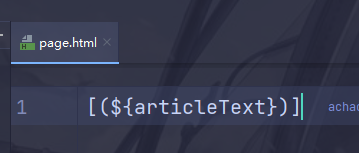
这里articleText就是我们后端setAttribute进去的
然后就能成功渲染页面上去
相关推荐
2021-03-28
获取不同时区的时间
真诚与朴实是天才的宝贵品质。——斯坦尼斯拉夫斯基 1234567891011121314151617181920212223242526272829303132System.out.println("下面的是两个默认时区的LocalDateTime");final LocalDateTime localDateTime = LocalDateTime.ofInstant(new Date().toInstant(), ZoneId.systemDefault());final LocalDateTime localDateTime1 = LocalDateTime.now();System.out.println(localDateTime);System.out.println(localDateTime1);System.out.println("下面的是两个通过Date.from()拿到的默认时区的Date");// 这里需要使用ZonedDateTimefinal Date from = Date.from(Instant.fr...
2020-12-04
解决lambda中必须为final的方式
一个真正而且热切地工作的人总是有希望的——只有怠惰才是永恒的绝望。——卡莱尔 在开发中使用lambda经常出现一个问题 编译提示我们lambda中使用的变量必须为final或者effectively final 1234567891011int i = 2;BigDecimal j = BigDecimal.ZERO;j = BigDecimal.TEN;List<String> stringList = mpUserMapper.selectList(Wrappers.lambdaQuery()).stream().map(UserDataObject::getUsername).collect(Collectors.toList());stringList = stringList.stream().distinct().collect(Collectors.toList());List<String> strings = new ArrayList<>(10);strings.stream().peek(s -> {...
2022-10-13
mp分页排序字段转换
竭诚相助亲密无间,乃友谊之最高境界——瓦鲁瓦尔 经常会遇到这种表格: 后端代码演示: 源码地址: https://gitee.com/VampireAchao/stream-query/blob/master/stream-plugin/stream-plugin-mybatis-plus/src/test/java/io/github/vampireachao/stream/plugin/mybatisplus/DatabaseTest.java
2022-09-04
maven版本号插件
莫等闲,白了少年头,空悲切——岳飞 我们maven项目除了使用这种方式修改版本号,还有一种统一管理版本号的方式: 项目地址:https://github.com/mojohaus/flatten-maven-plugin 官方文档:http://www.mojohaus.org/flatten-maven-plugin/ 引入: 12345678910111213141516171819<build> <plugins> <plugin> <groupId>org.codehaus.mojo</groupId> <artifactId>flatten-maven-plugin</artifactId> <!--<version>INSERT LATEST VERSION HERE</version>--> <executions> <execution> ...
2022-11-14
java ics解析ical4j
提防那种从不还手的人;他们既不肯宽恕你,也不容许你宽恕自己——萧伯纳 分享一个java解析ics的库 https://www.ical4j.org/ 安装: 123456789101112<project> ... <dependencies> <dependency> <groupId>org.mnode.ical4j</groupId> <artifactId>ical4j</artifactId> <version>1.0.2</version> </dependency> ... </dependencies> ...</project> 使用:https://www.ical4j.org/examples/parsing/ 我这里是获取节假日信息,数据来源:节假日补班日历 可以直接用hutool-HttpUtil 1HttpUtil.get("https:...
2022-07-27
sql注入工具类
日出之美便在于它脱胎于最深的黑暗。——辛夷坞 在mybatis-plus中内置了该工具类: 1234567891011121314151617181920212223242526272829303132333435363738394041424344454647484950/* * Copyright (c) 2011-2022, baomidou (jobob@qq.com). * * Licensed under the Apache License, Version 2.0 (the "License"); * you may not use this file except in compliance with the License. * You may obtain a copy of the License at * * http://www.apache.org/licenses/LICENSE-2.0 * * Unless required by applicable law or agreed to in writing, s...

阿超
我的名字叫阿超 年龄25岁 家在北京市 职业是软件开发 每天最晚也会在八点前回家 不抽烟 酒浅尝辄止 晚上十二点上床 保证睡足八个小时 睡前写一篇博客 再做二十分钟俯卧撑暖身 然后再睡觉 基本能熟睡到天亮 像婴儿一样不留下任何疲劳和压力 就这样迎来第二天的早晨 健康检查结果也显示我很正常 我想说明我是一个不论何时都追求内心平稳的人 不拘泥于胜负 不纠结于烦恼 不树立使我夜不能寐的敌人 这就是我在这社会的生活态度
Follow Me公告
This is my Blog