
unsloth
时间的步伐有三种:未来姗姗来迟,现在像箭一样飞逝,过去永远静立不动。——席勒

Run and train AI models with a unified local interface.
Features • Quickstart • Notebooks • Documentation • Discord
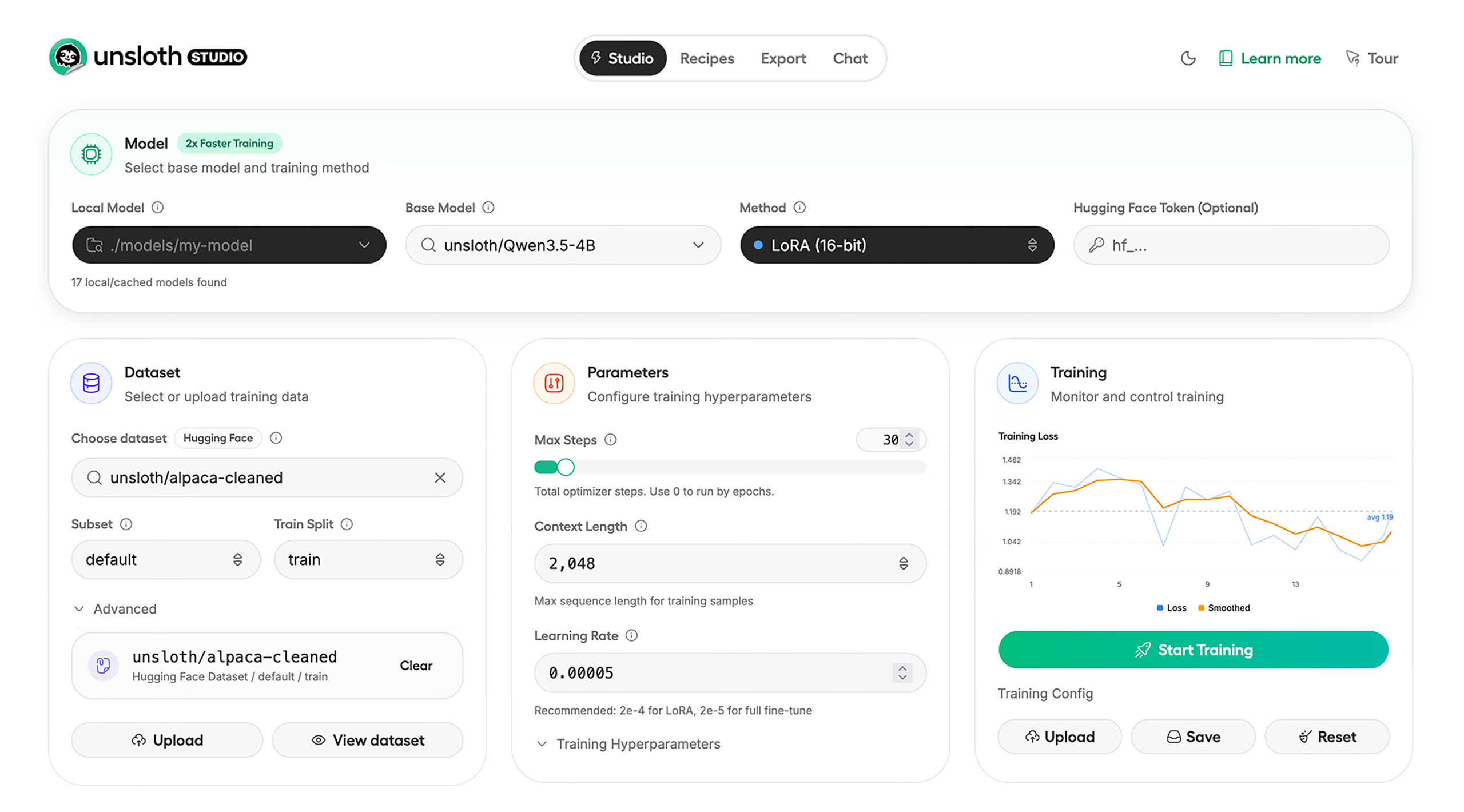
Unsloth:一只把“跑模型”和“训模型”都揽到怀里的懒懒树懒
仓库的描述很干脆,也很有野心:
Unified web UI for training and running open models like Qwen, DeepSeek, gpt-oss and Gemma locally.
他像一位“本地大管家”,不想让你在一堆工具、脚本、命令里东奔西走,于是把运行与训练开源模型这件事,收进一个统一的本地界面里。
而 README 的第二句话又给了他一个更具象的身份:
Unsloth Studio (Beta) lets you run and train text, audio, embedding, vision models on Windows, Linux and macOS.
他不止想让你“能跑”,还想让你“跑得顺、训得动、看得见、导得出”。
⭐ Features:他会做什么?先把你最需要的都准备好
Unsloth 把自己分成两面:Inference(推理) 与 Training(训练)。
像一个双面角色:一面负责把模型请来上岗,一面负责把模型拉去操练。
Inference:跑模型这件事,他很会照顾你
- Search + download + run models:能搜索、下载、运行模型(GGUF、LoRA adapters、safetensors 都能招呼)
- Export models:能把模型保存/导出到 GGUF、16-bit safetensors 等格式
- Tool calling:支持 self-healing tool calling 与 web search
- Code execution:让 LLM 在 Claude artifacts 或 sandbox 环境里“亲手试代码”
- 自动调推理参数、可自定义 chat templates
- 聊天时可上传图片、音频、PDF、代码、DOCX 等多种文件类型
他像一个聊天窗口里带着工具箱的工程师:你说话,他不仅回答,还能查、能跑、能修、能试。
Training:训练这件事,他更像“省显存的教练”
他在 README 里给出的训练承诺非常直接:
- 训练 500+ models
- 最高 2x faster
- 最多 70% less VRAM
- no accuracy loss
而且训练形态也不挑食:
- full fine-tuning、pretraining
- 4-bit、16-bit、FP8 training
再配上“训练可视化”能力:
- Observability:实时监控训练、跟踪 loss 和 GPU 使用、可自定义图表
- Data Recipes:从 PDF/CSV/DOCX 等自动生成数据集,并用可视化节点工作流编辑
- Reinforcement Learning:高效 RL 库,GRPO 等使用 80% less VRAM(还提到了 FP8)
他像在训练场里喊口令的那位:
“队形我来排,装备我来省,成绩你来拿。”
⚡ Quickstart:两条路,一条 UI,一条代码
Unsloth 说得很清楚:他有两种使用方式:
- Unsloth Studio(web UI)
- Unsloth Core(code-based)
像两种人格:一个偏“可视化指挥官”,一个偏“代码派工程师”。
Unsloth Studio(web UI):把控制台变成一间训练室
Unsloth Studio (Beta) 支持 Windows / Linux / WSL / macOS。
他还把不同硬件的状态说得明明白白:
- CPU:当前支持 Chat 与 Data Recipes
- NVIDIA:训练可用(RTX 30/40/50、Blackwell、DGX Spark、Station 等)
- macOS:目前支持 chat 与 Data Recipes,MLX training “coming very soon”
- AMD:Chat 可用;训练可用 Unsloth Core;Studio 支持 coming soon
- Coming soon:Apple MLX、AMD、Intel 的训练支持
- Multi-GPU:现在可用,重大升级在路上
他像一位诚实的店长:能做的现在就做,不能做的给你时间表(哪怕是“very soon”)。
macOS / Linux / WSL:一条命令把他叫醒
1 | curl -fsSL https://raw.githubusercontent.com/unslothai/unsloth/main/install.sh | sh |
如果没有 curl,README 说可以用 wget。
装好之后启动:
1 | source unsloth_studio/bin/activate |
他像在说:
“你把门牌号写好(host/port),我就在 8888 开门营业。”
Windows:PowerShell 也能一键开张
安装:
1 | irm https://raw.githubusercontent.com/unslothai/unsloth/main/install.ps1 | iex |
动:
1 | & .\unsloth_studio\Scripts\unsloth.exe studio -H 0.0.0.0 -p 8888 |
Docker:把他装进容器,连带工作目录一起带走
README 给出的 Docker 启动方式很标准,也很“全家桶”:
1 | docker run -d -e JUPYTER_PASSWORD="mypassword" \ |
1 | 他甚至把 “JUPYTER_PASSWORD” 都替你留好了位置——像给你递上钥匙的房东。 |
Windows PowerShell developer installs
1 | winget install -e --id Python.Python.3.13 |
他像一个效率控:环境创建、依赖安装、后端选择(--torch-backend=auto)都给你安排得丝滑。
Nightly:想追最新?他也准备了“边跑边追风”的路线
Nightly - MacOS / Linux / WSL
1 | curl -LsSf https://astral.sh/uv/install.sh | sh |
以后每次启动:
1 | cd unsloth_studio |
Nightly - Windows
1 | winget install -e --id Python.Python.3.13 |
以后每次启动:
1 | cd unsloth_studio |
他像一个“夜班营业员”:你想要最新功能?可以,跟我来走夜路。
Unsloth Core(code-based):更偏工程师的那一面
Linux / WSL
1 | curl -LsSf https://astral.sh/uv/install.sh | sh |
Windows
1 | winget install -e --id Python.Python.3.13 |
README 也提醒:Windows 下直接 pip install unsloth 只有在你已经装好 PyTorch 时才好用,并给出 Windows Guide。
AMD / Intel:他也没把你落下
README 指向了对应安装指南:
- AMD Guide
- Intel Guide
并提到对于 RTX 50x、B200、6000 GPUs 可以用:
uv pip install unsloth --torch-backend=auto
还提供 Blackwell 与 DGX Spark 的相关指南链接。
✨ Free Notebooks:他甚至把“免费训练”也端上桌
Unsloth 说:你可以用他们的 notebooks 免费训练,流程是:
Add dataset, run, then deploy your trained model.
并给出一张“模型 / 免费 notebook / 性能 / 显存占用”的表格(例如 Qwen3.5、gpt-oss、Gemma、embeddinggemma、Orpheus-TTS 等),同时也给了索引入口:
- Kaggle notebooks
- GRPO notebooks
- TTS notebooks
- embedding & Vision notebooks
- all models / all notebooks / docs
他像一个把训练场开放给大众的教练:
“先来练,练好了再去部署上场。”
🦥 Unsloth News:他还在不断长出新技能
README 的 News 像一份“树懒日报”,列了不少方向:
- Introducing Unsloth Studio(新的 web UI)
- Qwen3.5 多规格模型支持
- MoE LLMs 更快训练
- embedding fine-tuning 加速
- 更长上下文 RL
- 更快训练的 Triton kernels、padding free、packing
- 500K context 训练
- FP8 & Vision RL
- gpt-oss 相关 RL、Flex Attention、Guide
他不是一个静态工具,而是一只一直在进化、一直在加速的树懒。
🔗 Links and Resources:他给你所有出口,不让你迷路
| Type | Links |
|---|---|
| r/unsloth Reddit | Join Reddit community |
| Documentation & Wiki | Read Our Docs |
| Twitter (aka X) | Follow us on X |
| Installation | Pip & Docker Install |
| Our Models | Unsloth Catalog |
| Blog | Read our Blogs |
Citation:如果你要在论文或报告里提到他
1 | @software{unsloth, |
License:他一边开源,一边也保护自己的“工作室”
Unsloth 使用 Apache 2.0 + AGPL-3.0 的双许可证模式:
- 核心 Unsloth package:Apache 2.0
- 部分可选组件(如 Unsloth Studio UI):AGPL-3.0
他像在说:
“核心能力尽量开放给生态;而对 UI 等部分,我也要用合适的方式保证持续投入。”
Thank You to:他知道自己不是一个人跑出来的
README 里他很认真地感谢了这些伙伴:
- llama.cpp:让用户能运行与保存模型
- Hugging Face:transformers 与 TRL
- PyTorch 与 Torch AO 团队
- NVIDIA:NeMo DataDesigner 与贡献
- 每一个贡献者与使用者
他把“生态”这个词,写得像人情味。