jq获取实时宽度
发表于|更新于
|浏览量:
乐观使你倾向于幸福健康事业顺利,悲观使你倾向于绝望患病失败忧郁孤独懦怯——民谚
代码如下
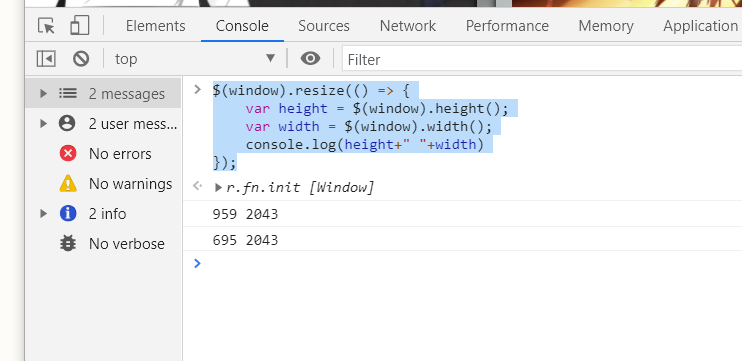
1 | $(window).resize(() => { |
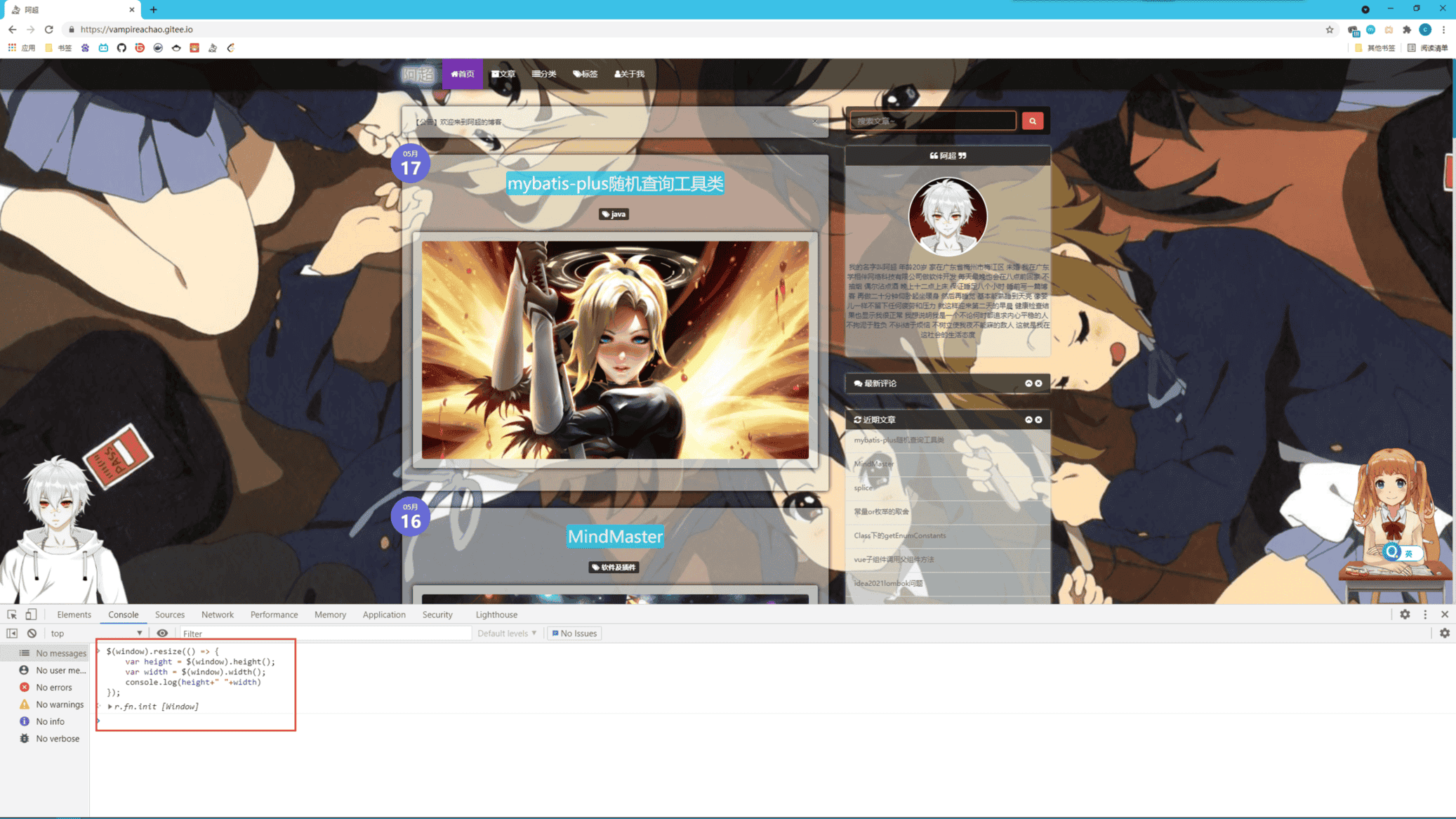
然后当我窗口大小发生变化时就会触发
相关推荐
2025-02-11
expo
谁终将声震人间,必长久深自缄默;谁终将点燃闪电,必长久如云漂泊。——尼采 https://docs.expo.dev/https://github.com/expo/expo Expo 是一个开源平台,旨在帮助开发者构建可以在 Android、iOS 和 Web 上运行的通用原生应用。通过结合使用 React 和 JavaScript,开发者可以在一个统一的环境中构建跨平台的应用,而不需要切换不同的技术栈。Expo 的核心优势之一就是它提供了一个完整的 SDK、模块 API、CLI 工具以及丰富的文档,极大简化了跨平台开发过程。 Expo 不仅支持快速开发,还通过其独特的功能和服务帮助开发者将应用构建、发布和迭代过程变得更加高效。例如,Expo 应用服务 (EAS) 提供了一套集成的服务平台,能够帮助开发者在个人或团队环境中更轻松地管理和发布应用。 Expo 生态Expo 提供了一个强大的生态系统,包括多个模块和工具,使得从开发到部署的每一步都能得到充分的支持。除了基础的功能开发之外,Expo 还包含了与 EAS 深度集成的服务,帮助用户自动化构建、分发和发布应用。这意味着你...
2022-07-16
veaury
没有意义的事物是最美丽的。——《新名字的故事》 昨天分享了vuera 今天再分享一个同类型库veaury,属于是vuera的新版库 中文文档:https://github.com/devilwjp/veaury/blob/master/README_zhcn.md 什么是Veaury?Veaury 是基于React和Vue3的工具库,主要用于React和Vue在一个项目中公共使用的场景,主要运用在项目迁移、技术栈融合的开发模式、跨技术栈使用第三方组件的场景。 重要功能 🌞 支持 Vue3 🌈 支持 Context - 同一个应用中出现的vue组件和react组件的context是共享的. 💗 支持跨框架的hooks调用 - 可以在react组件中使用vue的hooks,获取到vue组件或者应用的上下文数据,比如vue-router、vuex,也可以在vue组件中使用react的hooks,获取到react组件或者应用的上下文数据,比如react-router、provide、context等
2024-10-27
typescript-exercises(一)
你要克服的是你的虚荣心、炫耀欲,你要对付的是你时刻想要出风头的小聪明。——毛姆 题目: 123456789101112131415161718192021222324252627282930313233343536373839404142434445464748495051525354555657585960616263646566676869707172737475767778798081828384858687888990919293949596979899100101102103104/*Welcome to: ................................................................ . . . #################### #################### E . . ####################...
2023-02-06
js发送通知
温和的对待,不会使敌人变成朋友——萨迪 文档:https://developer.mozilla.org/zh-CN/docs/Web/API/Notification https://developer.mozilla.org/zh-CN/docs/Web/API/notification/requestPermission 代码如下 1234567Notification.requestPermission().then((permission) => { // If the user accepts, let's create a notification if (permission === "granted") { const notification = new Notification("Hi there!"); // … } }); 效果: 完整代码: 1234567891011121314151...
2024-07-22
Apache-ShenYu支持namespace功能
健康的身体是灵魂的客厅,病弱的身体是灵魂的监狱。——培根 我主要完成前端部分对接,pr如下: https://github.com/apache/shenyu-dashboard/pull/462 这里主要是结合redux-saga完成需求,例如modal/global.js shenyu-dashboard/src/models/global.js at 624a2afe74367b5c5a310627197d3622a8c896a4 · apache/shenyu-dashboard · GitHub 123456789101112131415161718192021222324252627282930313233343536373839404142434445464748495051525354555657585960616263646566676869707172737475767778798081828384858687888990919293949596979899100101102103104105106107108109...
2021-08-24
页面滚动事件
有些路是非要单独一人去跋涉,路再远再长,也得独自默默走下去。——席慕蓉 HTML DOM事件大全:https://www.runoob.com/jsref/dom-obj-event.html 可以如下写法: 12345window.onscroll = function() { console.log("滚动上下距离" + document.documentElement.scrollTop || document.body.scrollTop); console.log("滚动左右距离" + document.documentElement.scrollLeft || document.body.scrollLeft);}// jquery $(window).scroll(()=>{}) uniapp页面生命周期文档:https://uniapp.dcloud.io/collocation/frame/lifecycle?id=%e9%a1%b5%e9%9d%a2%e7%94%9f%...

阿超
我的名字叫阿超 年龄25岁 家在北京市 职业是软件开发 每天最晚也会在八点前回家 不抽烟 酒浅尝辄止 晚上十二点上床 保证睡足八个小时 睡前写一篇博客 再做二十分钟俯卧撑暖身 然后再睡觉 基本能熟睡到天亮 像婴儿一样不留下任何疲劳和压力 就这样迎来第二天的早晨 健康检查结果也显示我很正常 我想说明我是一个不论何时都追求内心平稳的人 不拘泥于胜负 不纠结于烦恼 不树立使我夜不能寐的敌人 这就是我在这社会的生活态度
Follow Me公告
This is my Blog